
The situations parents meet most often in BioKids, and what to do, in brief. Find yours in the list at the side (on a phone, in the headings below). If it is not here, write to us.
I forgot my PIN
- On the panel's sign-in page, press I forgot my PIN.
- Type the 8-word recovery code you wrote down during setup (or when you were added as a parent), with spaces between the words. The words are Turkish, written without Turkish letters, even on an English computer.
- Choose a new PIN.
If the recovery code is lost too: sign in to the computer with your own (parent) account, open Terminal from the applications menu and type the line below. It asks for the computer's password (not the PIN: the account password you chose when installing):
sudo biokids-admin reset-pinWith more than one parent it asks whose PIN it is; you can also say so up front: sudo biokids-admin reset-pin --parent NAME.
It says "too many tries"
After 5 wrong PINs in a row, signing in is closed for 15 minutes; if wrong tries go on, the wait doubles each time, up to a day. Each parent has their own count. Rather not wait? Reset your PIN with the recovery code as above.
I forgot the family passphrase
The family passphrase is asked for to turn protection off, remove a child, add or remove a parent, and back up or restore. If you forgot it, type this in a terminal and choose a new passphrase of at least 10 characters:
sudo biokids-admin reset-passphraseMy child's screen is locked
The screen locks when the day's time is used up, outside the allowed hours ("Waiting for their next window"), during a forced break, or when you locked it. On the panel's Today screen press +10 min or +30 min on your child's card: the lock opens by itself.
If the child's screen says "BioKids is not answering right now. Tell a grown-up.", BioKids' background service ran into a problem. At such a moment BioKids locks the session and tells you, rather than leave the child unprotected. Even after the service is back, the lock stays until you give time from Today. If the panel says "The BioKids service is not responding", restart the computer; if it keeps happening, tell us.
My child is not on the login screen
After BioKids is installed, the computer needs one restart: the picture login screen reads the children only when it starts. If you restarted and the child is still missing, check that they are listed on the panel's Children page.
My child has no internet
- BioKids' web filter fails safe: if the filter is not running, the children's accounts get no internet at all. Look at the "Internet filter" line under Settings → Protection; if it is not green, what to do is written beside it. A restart is often enough.
- If the child is on Only the sites I choose, only the sites you chose open. See the safe browsing guide.
- If one site will not open, it may be blocked: when the child presses Ask a grown-up, the request lands in Requests, and Allow opens that site.
The clock is wrong when I switch to Windows
On computers with BioKids beside Windows, Windows' clock may show a few hours ahead or behind. In Windows go to Settings → Time & language → Date & time and press Sync now. BioKids' time counting does not depend on the clock and is not affected.
Turning BioKids off for a while
Playing together? Start We're together in the panel: for 30 minutes, 1 or 2 hours nothing is counted, with no warnings and no lock. For a longer break, untick Let BioKids manage this child under Children → Time rules; your family passphrase is asked. Tick it again and protection is back.
Updates
BioKids never updates itself; you decide when. Open a terminal in your parent account and type the line below. It brings Debian's security updates too:
sudo apt update && sudo apt upgradeThe BioKids packages are upgraded together; do not try to upgrade one on its own. If an update brought something new, a restart is the cleanest way to pick it up.
Backing up and moving to a new computer
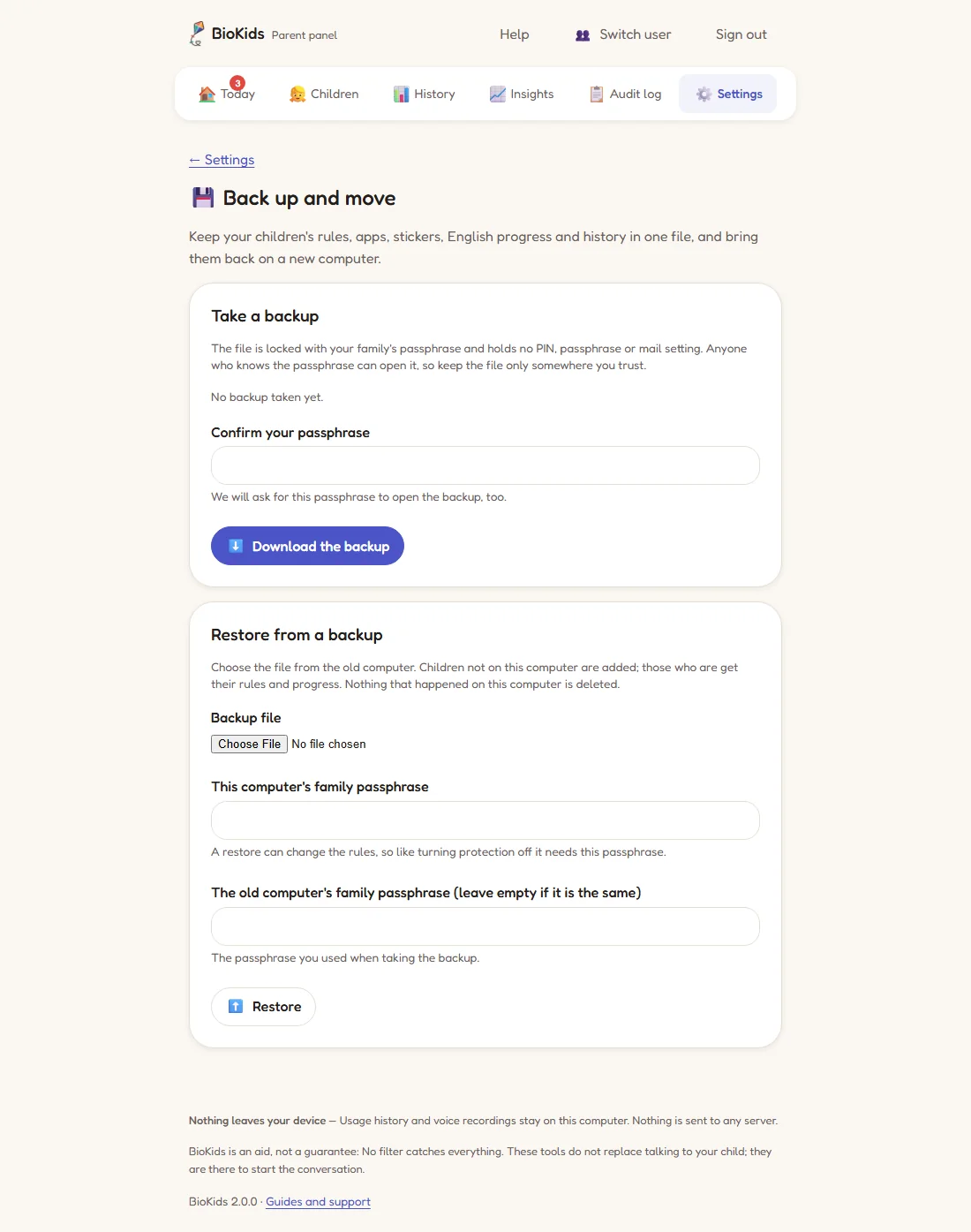
Settings → Back up and move keeps your children's rules, apps, stickers, English and reading progress and history in a single .biokids file.
- Type your family passphrase under Confirm your passphrase and press Download the backup. Keep the file on a USB stick or somewhere you trust.
- Install BioKids on the new computer and do the first-run setup.
- On the same page, under Restore from a backup: choose the file and type this computer's family passphrase and, if it was different, the old computer's.
- Restart the computer once, and set up email again.
Protecting the computer itself
Settings → Protection shows everything in one list: whether BioKids is running, the web filter, the browser's rules and extension, any other browser, email alerts, the backup, disk space, the clock and a boot password. Green items are in place; the others say what to do.
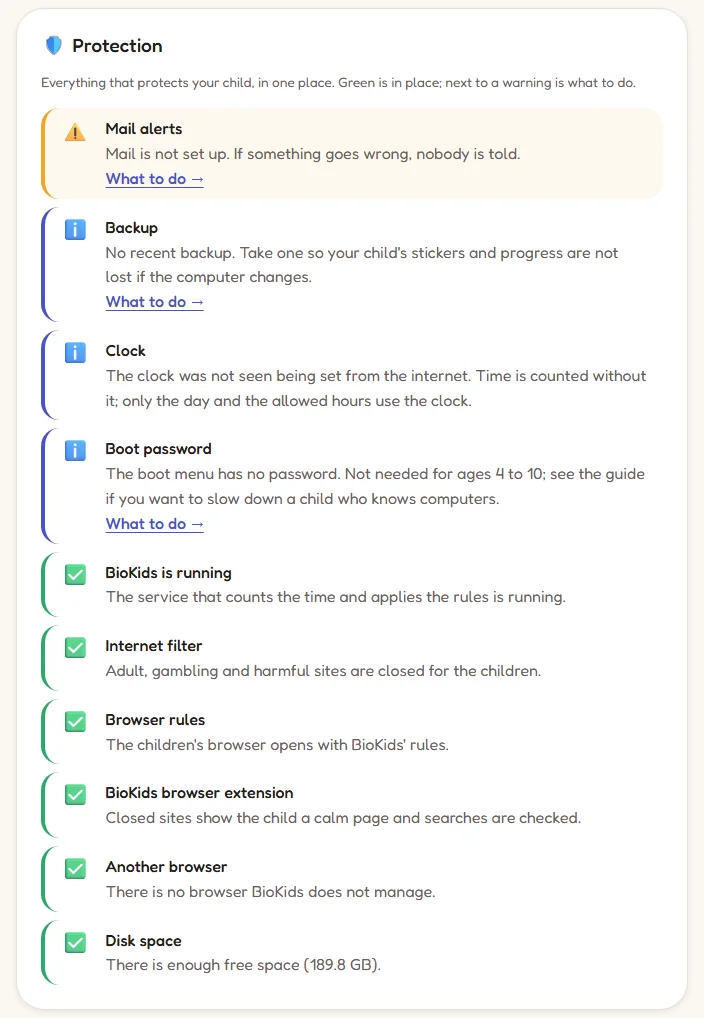
BioKids cannot stop someone who boots from a USB stick or takes the disk out. If you want to slow down a technically minded child, a password in the BIOS and on the boot menu is your choice; BioKids never sets one itself. How to do it, and how to undo it, is in the panel's Protecting the computer itself guide. Write down any password you set: a forgotten BIOS password can lock you out of the computer.
The boot menu and recovery mode
On a computer with only BioKids, the boot menu is hidden and waits for one second. Press Esc while the computer starts and the menu appears; from there you can reach Debian's recovery mode. On computers beside Windows the menu shows for 5 seconds at every start. If a start failed, the menu shows longer by itself on the next one.
Email notifications do not arrive
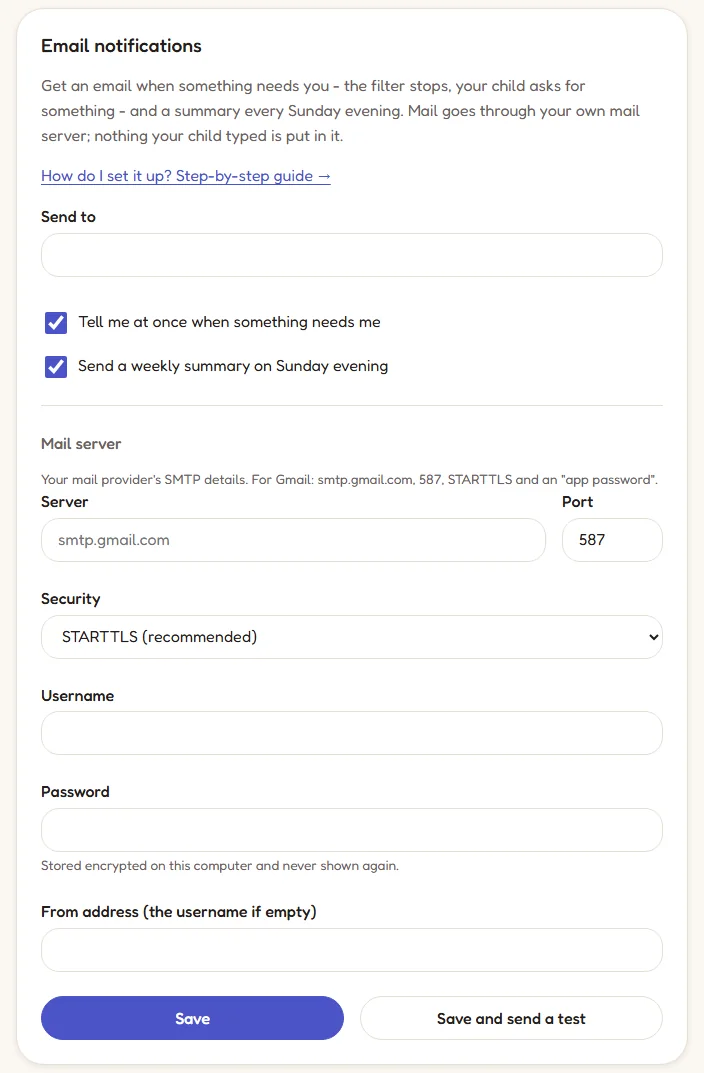
Fill in the details under Settings → Email notifications and press Save and send a test; if the test does not arrive, a setting is wrong.
- Gmail: server
smtp.gmail.com, port 587, STARTTLS, and as the password not your usual one but an app password created in your Google account. - Yandex and iCloud work.
- Personal Outlook / Hotmail accounts can no longer send mail this way; use another account.
Reporting a bug
If something does not work as it should, three things help us most:
- The version: at the bottom of the panel (e.g. "BioKids 2.0.0"), or
biokids-admin versionin a terminal. - The Debian version, and whether the computer is real or a virtual machine.
- The logs: the output of the command below. Remove any children's names from it before sending.
sudo journalctl -u biokids-daemon -n 200 --no-pagerThen fill in the bug form on GitHub or write to bilalsanli129@gmail.com. For hardware problems (the screen, sound, Wi-Fi, the microphone) there is a separate hardware form on GitHub.